Venera AI

Designing Daily Health Support for Chronic Patients

MY ROLE

  • User research

  • Cross-functional workshop

  • Information architecture

  • Design system

  • Prototyping

  • Usability testing

IMPACTS

Projected $1M return in 2 years • 3,000+ users by week 8

TIMELINE

March 2024 — June 2025

TOOLS

Figma • FigJam • Dovetail • Notion • Jira
  • Overview

  • With AI-powered technology and empathy, Venera AI supports chronic patients through daily health management.

    Venera AI is a health technology company that uses advanced AI to turn complex medical data into clear, evidence-based insights. Originally designed for healthcare professionals, our platform leverages natural language processing and machine learning to analyze patient medical reports and clinical databases, helping clinicians make faster, data-driven decisions.

    When I joined in early 2024, the company was expanding beyond hospitals and clinics to empower chronic patients directly, shifting from a B2B to a B2C model. The goal was to identify daily tasks that chronic patients, who manage their health independently between doctor visits, struggle with most, and design a product that could empathize with their daily challenges and offer meaningful support. Before my arrival, the team had already begun exploring this direction, evaluating how the existing clinical AI-powered technology could be adapted to meet the needs of our new users.

    My Role: I led the end-to-end design process from initial research to launch-ready product. I conducted stakeholder and user interviews, facilitated cross-functional workshops, and identified the advanced AI-powered features that would drive subscription revenue through our freemium model. I built a scalable Figma design system with reusable components and design tokens, increasing design velocity by 20%. I also validated and refined key design decisions through multiple rounds of iterative prototyping and usability testing, resulting in a 26% increase in user satisfaction.

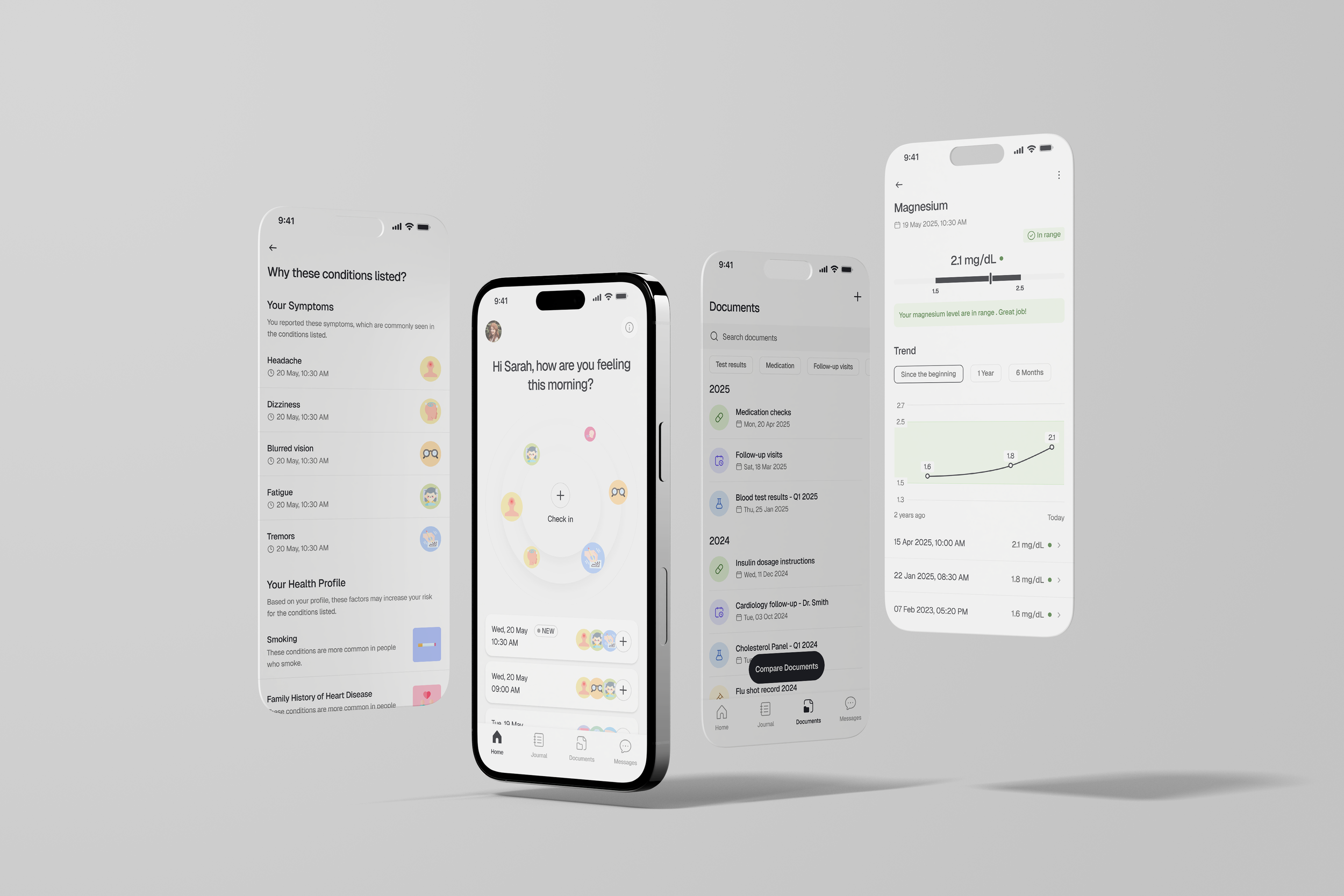
  • Main Flows at a Glance

  • Here's what I designed for Venera AI.

    An overview of the main flows I designed to address the challenges chronic patients face daily. The research insights, design iterations, and strategic decisions that shaped these flows are detailed in the sections that follow.

  • What did I discover early?

  • To fully understand chronic management, I must include not only patients but also their caregivers and healthcare professionals.

    Through initial research, I learned three key insights. First, most chronic patients don’t manage their health alone, they often rely on caregivers and healthcare professionals to help with their daily routines and treatment decisions. These findings made it clear that if we wanted to build a product that patients would actually trust and use, it needed to reflect the perspectives of not only patients but also caregivers and healthcare professionals. Second, the reason most patients stop using health apps or other digital platforms, or hesitate to take AI-powered advice is that these tools lack clinical validation. Without clinical validation, both patients and healthcare professionals question their accuracy and credibility. Finally, I found that patients primarily use their phones to manage daily tasks, such as tracking metrics or checking patient portals. Therefore, we decided that our new product should be a mobile app, rather than a web platform like the product for clinicians.

    From that point, I conducted interviews with twenty patients and caregivers about their daily challenges and feature expectations, followed by more interviews with ten healthcare professionals who would provide their clinical perspectives on the insights from previous patient interviews. This approach ensured all voices would be reflected in our final design.

  • What did I learn from research?

  • Insight 1: Patients struggle most with maintaining healthy diet, especially during social events.

    Both patients and healthcare professionals agreed that diet is one of the most difficult parts of managing chronic condition. Patients often struggle to make healthy food choices, especially when dining out or celebrating with friends and colleagues. Many stop following their diets once they start feeling better, unaware of the long-term risks. Healthcare professionals highlighted that progress comes from small, consistent changes rather than strict restrictions or sudden changes. Building confidence through achievable goals and showing how diet connects to their overall well-being can help patients stay on track.

  • Insight 2: Understanding the condition is fundamental to managing it.

    Patients and caregivers wanted simple, clear information about what causes their symptoms and how their condition might progress. Many patients felt lost after brief or overly complex medical consultations. Healthcare professionals, on the other hand, focused on managing expectations, emphasizing that chronic conditions cannot be “cured”, they must be managed over time. They noted that both patients and their caregivers must learn to accept and manage the condition, rather than seek magic cures from unverified sources. This difference revealed an opportunity to use our existing AI technology and clinical databases to help patients better understand their condition, set realistic expectations, and feel more in control of their health journey.

  • Insight 3: Patients are overwhelmed by conflicting prescriptions from multiple doctors.

    Patients and caregivers were often overwhelmed by the number of medication brands and conflicting instructions from multiple doctors. Many were hesitant to use their prescribed medications out of fear that they might experienced dangerous side effects from taking a wrong combination (especially from patients with multiple chronic conditions). Healthcare professionals worried that this avoidance, which was often fueled by misinformation, could prevent effective treatment. Both groups saw the need for better communication and personalized guidance to help patients follow their treatment plans confidently.

  • Insight 4: Patients and caregivers carry profound emotional burden.

    Patients described feelings of grief and helplessness after their diagnosis, struggling to adjust to new limitations and the loss of their daily routines. Caregivers also carried a heavy emotional burden, often feeling anxious or guilty about their role in treatment decisions. Many questioned whether they were doing enough or making the right choices for their loved ones, while also facing pressure from family, friends, and even other clinicians. These experiences highlight the need to design features that provide reassurance and emotional support. Our product would fail if it treated users as data points rather than recognizing the human emotions behind their experiences.

  • How did I decide which product ideas to pursue?

  • I facilitated a cross-functional workshop to prioritize Quick Wins features.

    With a wide range of ideas from stakeholder interviews, user requests, and research insights, I shifted from exploring possibilities to deciding which ideas to pursue. To do this, I held a prioritization workshop with a cross-functional team that included business advocates (our company founders), a user advocate (myself), developers and ML engineers, and a product manager. Each participant received dots to vote on ideas, value dots for business and user advocates, and complexity dots for developers, based on how impactful or effortful we believed each idea would be. This collaborative exercise helped us quickly uncover which ideas offered the most value for the least complexity.

    We then mapped all ideas onto a Value–Complexity matrix, where those in the high-value and low-complexity quadrant, our Quick Wins, became the starting point for MVP roadmap. These features included:

    • Chatbot

    • Meal logging and recommendations

    • Social event planning

    • Medication tracking and conflict detection

    • Medical report summarization

  • How did I validate my design decisions?

  • I tested our prototype with real users to validate three critical design decisions.

    After the internal concept review and several rounds of low-fidelity iteration, I created a high-fidelity interactive prototype to test three critical design decisions for the MVP release with 12 participants.

    Testing Method: Moderated usability testing with think-aloud protocol. Success was measured by task completion without requiring Level 2 or Level 3 prompts (Level 2 = hints/clarification; Level 3 = direct instruction or user gives up).

    The testing focused on three key objectives:

    1. Validating home screen’s content: Determining whether users prefer seeing and getting quick access to their medication tracking, meal recommendation, or medical report summarization.

    2. Testing manual logging: Assessing how willing users are to manually log meals, medications, and medical reports, and whether the design feels simple and intuitive enough to do so without confusion.

    3. Evaluating feature usability: Examining how users understand and trust the AI-powered features and identifying any concerns that might affect their willingness to authorize data access.

  • How did I apply insights from user testing?

  • Insight 1

    Six out of twelve participants preferred quick access to meal logging and recommendations over other options on the home screen, as it felt most useful for their daily use.

  • Decision

    We chose home screen which prioritized meal logging and recommendations.

  • Insight 2

    Too many required fields for meal logging caused eight out of twelve participants to abandon the task. They reported that scrolling felt endless.

  • Decision

    We added a "Quick Log" option for 5-second meal entry, made all detailed fields optional, and condensed the form layout.

  • Insight 3

    Participants largely overlooked the chatbot button placed at the bottom of the screen. Several mentioned that it looked more like a technical service than a friendly companion they expected from our seal mascot.

  • Decision

    We moved the chatbot button to the top-right corner and added the prompt “How can I help?” to make our chatbot more visible and emotionally inviting.

  • Insight 4

    Participants valued individual visit summaries but emphasized the need to compare different visits to see "the whole picture."

  • Decision

    We prioritized selecting multiple visits for comparison view.

  • Final designs

  • Design updates led to a 26% increase in user satisfaction.

    Given what we observed in user testing, we simplified meal logging, redesigned chatbot button, and added a new flow for report comparison across visits. To address the current gap in understanding long-term engagement with our AI-powered features, I also recommended tracking which features users interact with most during their first three months. These insights will help guide future prioritization and product improvements.

  • What did I learn?

  • I learned to design as a team sport.

  • Design within the ecosystem, not in isolation.

    Early on, I'd get excited about user insights and immediately jump to crafting what I thought was the perfect solution, only to hit walls when talking to developers or product managers. I realized I needed to bring everyone into the conversation earlier, understanding what kept the engineering team up at night, what business metrics mattered most to stakeholders, and where the company stood in its design maturity and project history.

  • Invite stakeholders to observe user research, they become advocates for the findings.

    I used to present research findings to stakeholders and struggle to get buy-in. Then I invited them to observe interviews and usability testing directly. They stopped being passive reviewers and became active partners. This transformed how decisions were made later, stakeholders who participated in user research became the biggest advocates for the research-driven changes that I proposed, making it far easier for me to get buy-in for solutions that addressed real user needs.

  • Structure ideas into granular user stories before prioritizing.

    Breaking down high-level ideas into specific user stories with clear acceptance criteria helped me move from exploring possibilities to committing to actionable work the whole team could understand. This upfront clarity made it easier later to estimate effort accurately, align with our developers on what "done" looked like, and avoid rework later when assumptions turned out to be misaligned across the team members.

Next
Next

Heiroom